
ASCENSION REDUNDANCY CONTROL · ARC

Main goes down.
Keep the show
within reach.

Supervise the playback pair, automate takeover to a ready Backup and tell connected equipment to follow. ARC keeps your browser workspace and Stream Deck control together at an independent operator workstation.

WINDOWSmacOSLINUXTRAY / MENU-BAR APP
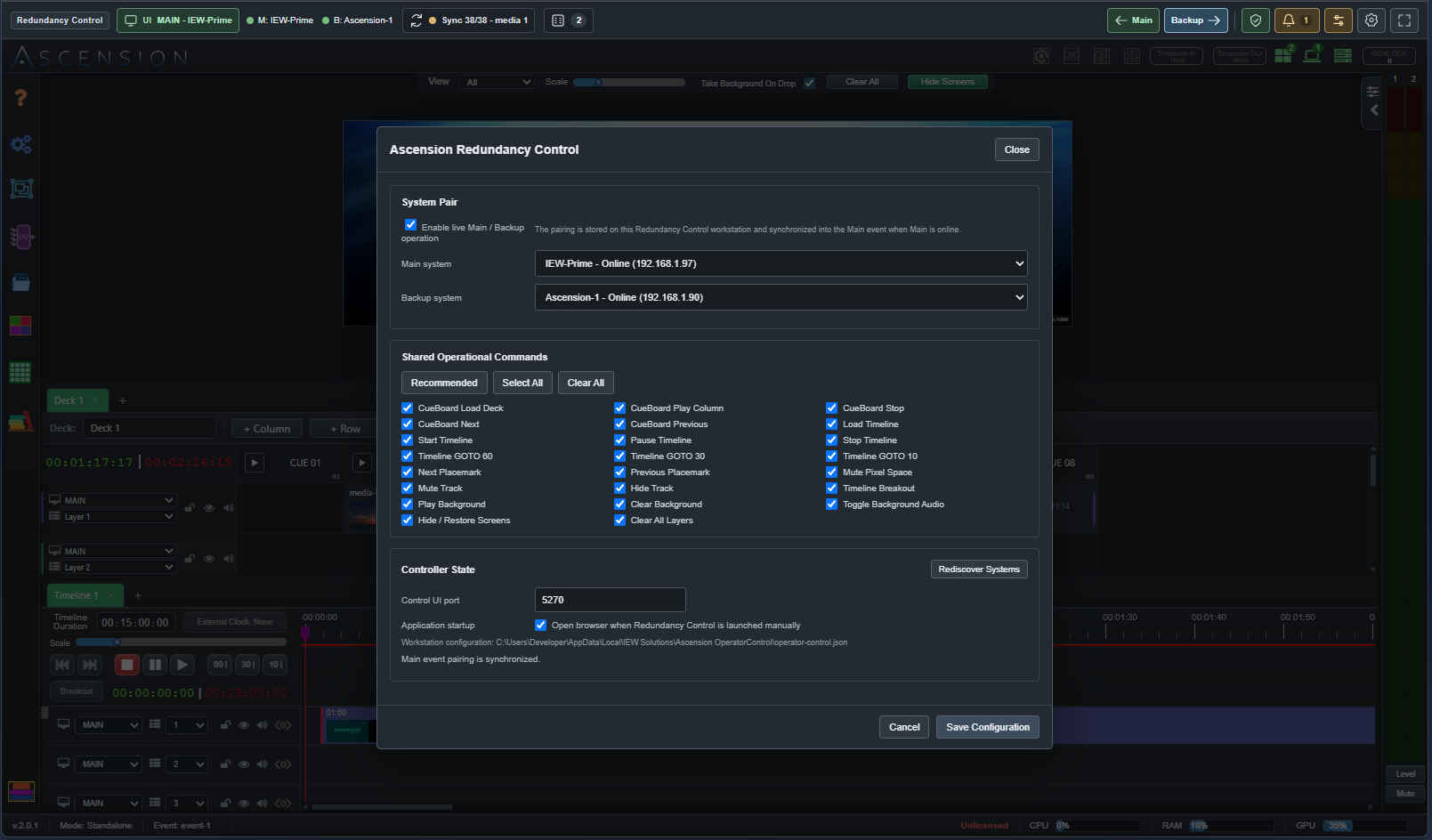
ARC pair configuration over the Ascension workspace, showing Main and Backup selection, shared operational commands and the persistent control header
One control position for the pair. Choose Main and Backup, share operational commands and keep recovery controls above the workspace. Select any screenshot for the full view.
DETECTWatch the engine and outputs.

Monitor communication, engine response, frame progress and the output rules you configure.

COORDINATEGive takeover a complete plan.

Check Backup readiness, transfer under your policy and run the configured external commands.

CONTINUEKeep the operator connected.

The browser and USB decks stay at the independent workstation when a playback server is lost.

SUPERVISED AUTOMATIC FAILOVER

Recognize the fault.
Coordinate the takeover.

Choose the conditions that matter to your production. ARC confirms configured faults and checks that Backup is ready before an armed automatic transfer.

Server & engine health

Detect lost server communication, a stopped or crashed engine, an unresponsive engine and stalled channel frame progress.

Protected outputs

Choose critical outputs or Extended nodes and map their Backup counterparts. Configure alerts or failover for the resources the production depends on.

Your protection policy

Set Ignore, Alert only or Alert + failover where supported, with response timeouts, confirmation delays and startup grace. Monitor engaged external clocks and receive sustained resource-pressure warnings.

A ready destination

Check Backup engine health and required outputs. You can also require the saved show revision and necessary media to be synchronized before takeover.

You control recovery. Arm or disarm protection, acknowledge alerts and transfer manually from the persistent header. After a protection transfer, ARC holds on Backup until you choose to return to a ready Main.

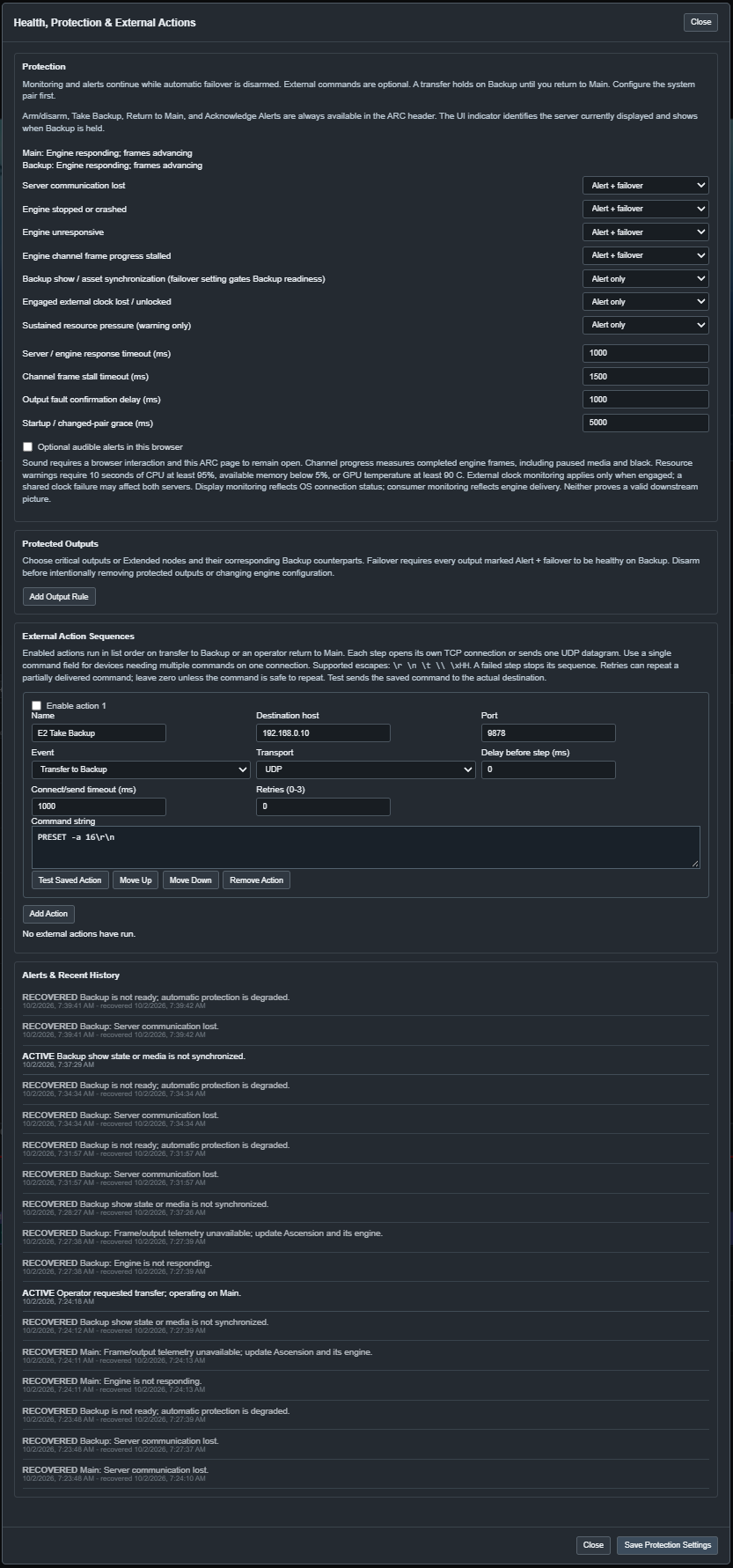
ARC protection controls with individual fault policies, frame stall timeout, output fault confirmation delay and startup grace
Protection configured for your show. This detail shows the monitoring policies and timing controls. Open the image to inspect all settings and alert history.

AUTOMATIC EXTERNAL COMMAND STRINGS

Tell the rest of the
production to follow.

A takeover can do more than change the operator's view. ARC can automatically send your TCP or UDP command strings to a compatible switcher, router or automation system so downstream equipment selects the Backup signal path.

Create separate sequences for transfer to Backup and return to Main. Each enabled step has its own destination, command string, delay, timeout and retry setting. Steps run in the order you arrange them; a failed step stops that sequence.

TCP OR UDPORDERED STEPSPER-STEP TIMINGTEST SAVED ACTION
External Action Sequences controls with event selection, destination host and port, TCP or UDP transport, delay, timeout, retries and a command string field
Make the handover part of the production. Configure the command syntax and destination for your receiving equipment.

The selected server changes before external actions run. ARC sends the configured bytes; confirm the receiving equipment's response during rehearsal.

A PLANNED RESPONSE TO A MAIN FAILURE

  1. Confirm the faultAn enabled Main fault satisfies its configured timing and protection policy.
  2. Check BackupThe Backup passes engine, output and any required show/media readiness checks.
  3. Transfer & sendARC selects Backup and runs enabled Backup actions to coordinate downstream equipment.
  4. Keep operatingThe browser and decks remain at the operator workstation; return to Main when ready.
Command strings and sequence behavior

Use the exact protocol expected by the receiving device. ARC supports \r, \n, \t, \\ and hexadecimal byte escapes such as \xHH. Each step opens its own TCP connection or sends one UDP datagram. Put multiple commands in one field when the receiver needs them on the same connection.

For example, if your own control receiver is programmed to recognize these lines, a Backup action could send SELECT BACKUP\r\n and a Main action could send SELECT MAIN\r\n. These are illustrative commands for that receiver. Use your switcher or router's documented commands for an actual installation.

Test Saved Action sends the saved command to its destination. Enable retries only for commands that are safe to repeat. Delivery status and faults appear in ARC's alert history and workstation log.

THE RECOMMENDED THREE-MACHINE SETUP

Two playback servers.
One independent
control position.

Run Main and Backup on the production machines. Put ARC, the operator browser and USB Stream Decks on a separate third computer connected to the production network.

That independent workstation preserves browser and physical control when a media server fails. ARC remains available to supervise the pair, display the available Backup workspace and coordinate the next move.

ARC also works with a single Ascension server. For Main / Backup operation, keep the operator workstation independent of both playback machines.

OPERATOR WORKSTATIONARC + browser workspace + USB Stream Decks
PRODUCTION NETWORK · CONTROL & STATUS
MAINAscension + playback engine
BACKUPAscension + playback engine
SWITCHER / ROUTER / AUTOMATIONOptional TCP / UDP commands from ARC on transfer

Each server has its own playback resources and outputs. Configure downstream equipment to select the appropriate production signal path.

SHOW SYNC & SHARED OPERATION

Keep Backup prepared as the show changes.

Ascension replicates saved Event, CueBoard, Timeline and console configuration from Main to Backup. Show revision and pending media status make preparation visible, while selected shared commands let you operate the pair together.

Require synchronized show data and media for takeover when the production calls for it. Validate playback timing and both output paths during rehearsal.
STREAM DECK AT THE OPERATOR POSITION

The same decks stay in your hands.

ARC replaces the separate remote SD-Bridge download and owns the USB connection at the operator workstation. Physical key events reach both available servers in the configured pair, so Backup remains controllable when Main is lost.

Continue building consoles, pages, function stacks and button faces in Ascension. ARC supports multiple attached decks and shows their count in the header.

Explore console programming →

GET STARTED WITH ARC

Install. Pair. Rehearse.

ARC is an installed Windows, macOS or Linux companion app. It runs from the tray or menu bar and hosts the control workspace in your local browser.

  1. Install the companion

    Choose the package for your operator computer from the public ARC downloads; no registration is required. ARC packages are also available through the download prompt presented to remote clients in Ascension Global Settings.

  2. Open the workspace

    Launch ARC and connect any USB decks. Open Redundancy Control from the tray or menu bar. The browser workspace defaults to 127.0.0.1:5270.

  3. Pair & configure

    Select Main and Backup, enable pairing and choose shared commands. Set the protection policies, critical output mappings and external action sequences.

  4. Rehearse & arm

    Verify show/media readiness, manual takeover, browser and deck control on Backup, downstream selection and return to Main. Then arm automatic protection.

Available from the tray or menu bar.

Open the workspace, configure the pair, view the log and choose startup behavior from the companion app. Pairing and protection settings belong to the ARC workstation.

When the browser and deck are local to an Ascension server, enabling Stream Deck access uses the installed local bridge. The companion download prompt is presented to remote browser clients.

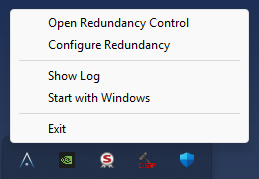
ARC Windows tray menu with Open Redundancy Control, Configure Redundancy, Show Log, Start with Windows and Exit
Windows tray menu shown.

Plan the complete handover.

Does ARC need a physical Stream Deck?

No. The browser workspace, health monitoring and protection controls work independently. A physical deck adds a USB control surface at the ARC workstation.

How does ARC switch the audience-facing output?

ARC supervises takeover and can send configured external commands to compatible switching or routing equipment. Your output wiring, receiving-device protocol and command sequences determine how the audience-facing signal changes. Browser UI availability, saved show synchronization and a protection transfer are separate parts of that complete path.

What happens when Main recovers?

After a protection transfer, ARC holds on Backup. Use Main in the persistent header when the recovered system is ready. Enabled return-to-Main actions can restore the downstream selection.

How should I handle external commands inside shared console actions?

Physical Stream Deck events reach both available members of the pair, so both servers may run external commands in their console stacks. Design those commands to tolerate or avoid duplicates. ARC's own transfer action sequences run at the independent workstation for the transfer event.

How do Backup and Extended systems differ?

Backup is the redundant counterpart for takeover. Extended nodes contribute rendering and output capacity to a Primary's Distributed Canvas. ARC can monitor configured critical Extended resources as part of the protection design.

YOUR FAMILIAR WORKSPACE · PROTECTED CONTROL

Keep programming.
Keep control in sight.

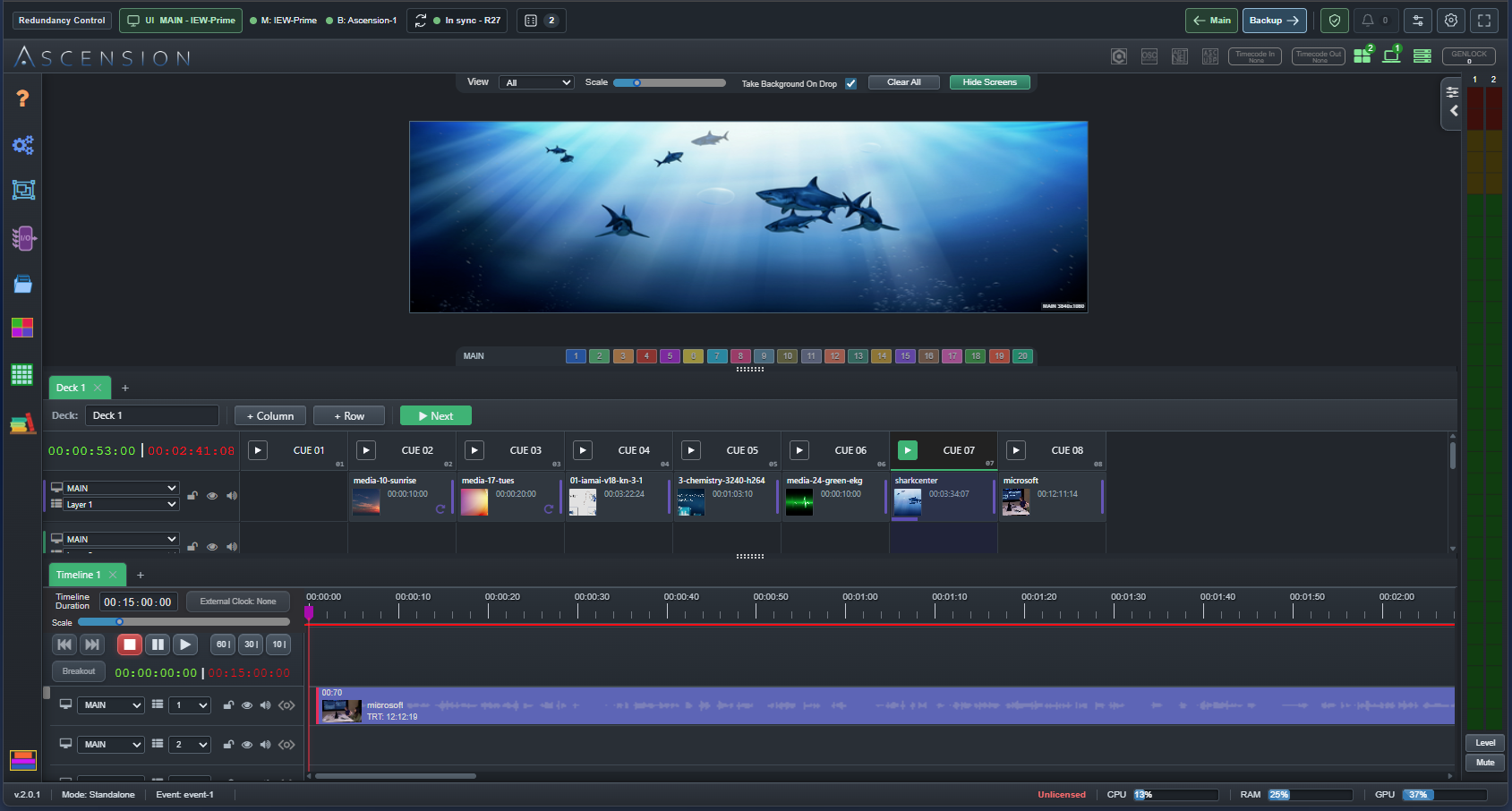
Work in Ascension's CueBoard and Timeline with ARC's persistent header above them: the displayed server, Main / Backup health, show revision, attached decks and recovery controls stay within reach.

Complete Ascension CueBoard and Timeline workspace inside ARC, with the Main UI badge, Main and Backup status, show synchronization, two attached decks and persistent transfer controls
Ascension + ARC. Build the show, keep Backup prepared and give the operator a planned response to failure.

Put ARC at the independent control position and rehearse the complete Main / Backup workflow.