
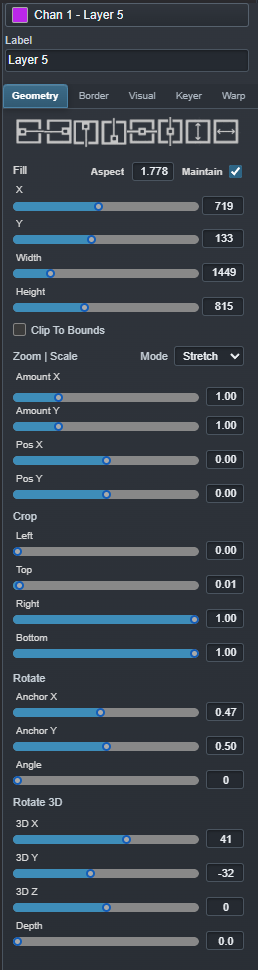
GEOMETRY
Position, frame and rotate.
Precise placement, sizing, crop, anchors and X/Y/Z rotation.
LAYERS + VISUAL DESIGN
Ascension combines real-time layer compositing, detailed visual treatment, three-dimensional motion and integrated output warping inside the same production environment.

Interactive output design
Move, resize, align, crop, zoom and rotate layers with interactive controls or exact numerical values.
Precise placement, sizing, crop, anchors and X/Y/Z rotation.

Borders, custom edge artwork, shadows, blur, spread and opacity.

Brightness, saturation, contrast, gamma, levels, opacity and inversion.
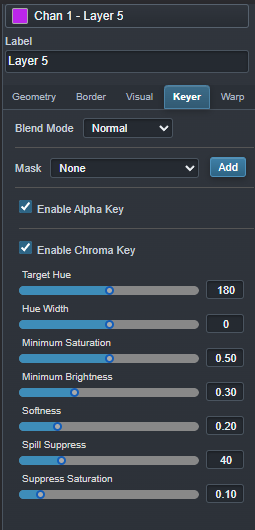
Alpha transparency, image masks and adjustable chroma-key controls.
BUILT-IN MASK EDITORS
Ascension includes interactive editors for both output blanking masks and per-layer alpha masks. Draw polygons, rectangles and ellipses directly against the visual reference, then adjust inversion, edge softness and opacity without leaving the production environment.
Create blanking geometry directly over the output image for projector spill, unused display regions, scenic openings and irregular presentation surfaces. Combine custom polygons, rectangles and ellipses, invert individual shapes, soften their edges and control opacity while working against an adjustable alignment grid.
The resulting mask can be saved directly from the editor without modifying the source media used by the production.

Build an alpha mask against the actual layer image instead of preparing another media file in an external graphics application. Polygon, rectangular and elliptical regions can be combined to create custom apertures, scenic cutouts and compositing treatments.
Shape inversion, edge softness and fill opacity can be adjusted interactively while the original media remains unchanged.

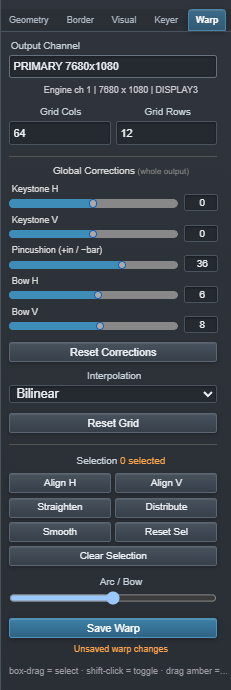
Integrated output warping
Configure the warp grid, select points or groups, and apply local or global corrections for keystone, bow and irregular display surfaces.
Motion-ready controls
Geometry, crop, pan, zoom, opacity, audio and three-dimensional orientation can be keyframed and rehearsed in the live output preview.